If ROB RUN runs smoothly while you stand still and the FPS drops when you move the mouse, lower the mouse polling rate first. Kefir has a support article for that exact symptom. For generally low FPS or poor visibility, use the Graphics menu to compare shadows, lighting and other effects on your own PC. The two walkthroughs below show where to change the options and what their creators chose.
How do I match my mouse sensitivity from another game?
Keep the mouse DPI the same and measure the distance needed for one full turn in your previous game. In ROB RUN, adjust General Sensitivity and repeat the same unscoped turn until the distance is close. Check aiming down sights separately, since a match while unscoped does not verify the scoped result. Related guide · Source 1
Check whether moving the mouse triggers the drop
Try turning the camera and then holding the mouse still in the same area. If the game is smooth whenever you stop moving the mouse, compare what you see with the symptom in Kefir’s support note. Open the configuration app for your mouse, find Polling Rate, lower it and try the same camera movement again. Keep the graphics settings where they were while you check that one change. Kefir’s mouse movement and FPS help
Use the polling rate setting in the mouse software. Some utilities label it Report Rate, and changing in-game sensitivity will not reproduce the adjustment covered by the support article. Record the original polling rate and retest after choosing a lower value so you can tell whether it helped. Different creators mention the values that worked with their devices, while Kefir’s recommendation is to lower the rate for this particular symptom. Hone’s explanation of polling and stutter · Creator example at 0:18
If the stutter continues, the official page also lists current graphics drivers and turning off third-party overlays among its next checks. Try the changes separately so you can see which one makes a difference. If the game closes instead of continuing to run at low FPS, the launch crash troubleshooting guide covers that symptom and the official error codes.
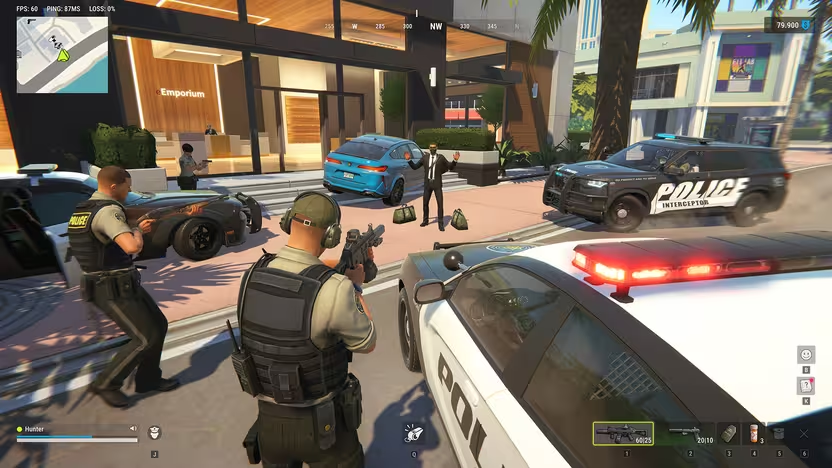
To see short stutters, open Steam → Settings → In Game → Performance Monitor and select a detail level with the FPS graph. Repeat the same camera movement or route and look for dips that coincide with the stutter. Keep ROB RUN’s own ping and packet-loss readings visible when you need to check the connection. See the ROB RUN connection troubleshooting guide. Valve · Steam Performance Monitor · Tpose Gaming · ROB RUN performance metrics
If turning still stutters after lowering the polling rate, select FPS Details, CPU & GPU Utilization in Steam’s Performance Monitor. Compare the FPS graph and CPU and GPU readings in the same spot, first while standing still and then while turning, with your frame cap and VSync unchanged. Repeat with a lower Render Resolution to see whether reducing rendering work helps. If it happens only when you move around online, compare the in-game ping and packet loss and use the loading and connection guide. Steam Support · r/robrun
Check FPS, ping and packet loss in the same session
Open Settings, choose Other and find Display performance metrics. Turn on Frame Rate, Network Latency and Packet Loss so you can compare the readings in one session. If FPS stays steady while latency or packet loss rises, investigate the connection and use the loading troubleshooting guide if the game stalls. Tpose Gaming · Kefir
If turning the camera stutters even in the character creator, try 500 Hz if your mouse software offers it. Two Steam players reported smoother movement after switching to 500 Hz from 1,000 Hz and 2,000 Hz respectively. Kefir recommends lowering the rate for movement-triggered FPS drops, so retest the same camera motion before changing other settings. If FPS stays steady but characters rubber-band, check ping and packet loss instead. See the server and connection checks. Kefir Help Center · Steam Community
Find the Graphics options before changing a preset
The English walkthrough opens Settings and moves through Graphics, including the frame-rate limit and VSync. At 1:13 it shows the Advanced list, where Motion Blur, Depth of Field, Additional Light, Shadows and Texture Quality appear. Use the footage to locate those controls before you start making changes. The selections shown belong to the creator’s setup, which gives you an example to compare against your own display. Open the English settings walkthrough
Check your current frame-rate limit and VSync before changing the advanced options. Write down the starting choices and keep them consistent if your next comparison is about shadows or lighting. That lets you tell which setting you tested if you return to the same area and see a different result. The walkthrough can help you find a control again when you want to restore it.
Open Settings → Graphics → General to find Screen Resolution and Render Resolution. The first sets the display resolution, and the second controls how finely the game renders the scene. Leave the first alone and lower Render Resolution one step, then repeat the same route and compare FPS and the clarity of distant signs. If the scene becomes harder to read or the frame rate barely changes, restore the original value. See the server status and connection guide if ping or packet loss also rises. This is Shran · Graphics menu at 0:24 · Valve · Steam Performance Monitor
Compare shadows and additional lighting separately
Espanola7 shows the Russian Graphics menu and changes the Additional Light Shadows option. Around 2:23 it is enabled in the footage, and around 2:39 it is disabled. The creator reports a difference on their RTX 3070 Ti, but the clip does not provide a repeatable benchmark for other setups. You can still use it to find the option and compare the result in your own game. See the Russian lighting and shadows example
Shadows, Additional Light and Additional Light Shadows appear as separate controls. If you want to know whether the shadow change helps, leave the other settings alone and repeat the same camera movement in the same location. Look at the lighting and visibility as well as how the movement feels. Keep the choice that works for your system and the way you want the game to look.
Adjust visibility according to what you can see
Motion Blur and Depth of Field are visible in the English walkthrough’s Advanced Graphics section. Compare them in a place where you can move the camera and look at the same objects again, then decide which presentation is easier for you to read. Texture Quality also has its own control, so you can review it independently of those effects. This is a practical way to settle on a visual preference without copying all of the creator’s settings together.
Consider which type of trouble you are trying to address before opening the menu. A player trying to reduce the visual blur during a camera turn is comparing a different thing from a player whose frame rate collapses as soon as their mouse moves. Start with the relevant control or the official mouse advice, then check that specific symptom again. If you change several settings together, return to the starting values before trying to isolate the one that mattered.
Compare changes in a repeatable way
Use the same area, resolution and route for your first comparison. Note the game version, the hardware you are using and the option you changed, then repeat the same movement. The available articles distinguish graphics load, input-related stutter and network symptoms, and the videos are individual examples of settings in use. This comparison helps you judge a change on your own machine without treating an anecdotal FPS gain as a promise. Games.gg’s settings and troubleshooting walkthrough
If the problem happens across different areas, compare one familiar area first and then try another before settling on the change. Save the settings that make a visible difference so you can return to them after an update or another experiment. The Steam requirements provide context for the hardware in a report, and a persistent loading problem has a separate checklist. Follow the loading screen troubleshooting guide if your actual symptom is waiting at startup instead of low FPS during play. Steam system requirements
Look at the FPS reading while you reproduce the symptom, especially if the game feels slow in a busy location. The performance articles distinguish low FPS from connection problems, so keep any changes in the frame rate separate from delayed or interrupted online play. Write down when the problem starts, such as the moment you turn the camera or enter a particular area. That gives you a concrete observation to compare after the next adjustment. Performance symptoms and FPS checks
As of November 12, the ROB RUN Steam feature list does not advertise controller support. Kefir defines E-0601 as the game failing to detect basic input devices. If you see that code, connect a physical keyboard and mouse directly to your PC before starting the game. See the launch troubleshooting guide. Steam · Kefir · Steam Community
If Steam detects your controller, open the controller layout for ROB RUN in your library and try mapping it to keyboard and mouse inputs. Valve documents these bindings in Steam Input, and a ROB RUN player reports using Steam Input on PC. Start by checking movement, camera and interaction somewhere safe, and keep a keyboard and mouse handy for menus or prompts the layout misses. See the launch troubleshooting guide. Steamworks · Legacy Mode Bindings · Steamworks · Controller layout · r/robrun
If Lenny’s menu won’t scroll on your ROG Ally, test the list with a physical mouse first. If it scrolls, open the Steam Input layout for ROB RUN and try assigning mouse wheel up and mouse wheel down to two controls. ASUS also documents Desktop Mode for mouse input on the Ally. Try the controls in the motel before taking them into a run. See the Cash Stash and bank guide. Valve · Steam Input · ASUS · ROG Ally · r/ROGAlly
If game audio drops out but Windows sounds still play, check that ROB RUN is unmuted in the Windows volume mixer and uses the intended output device. On Windows 11, open Settings → System → Sound → Volume mixer and look under Apps. If those settings look right and your frame rate also drops, note whether both symptoms start at the same moment. A player reported both problems, but the report does not establish that they share a cause. See the voice chat checks for party play. Microsoft · Windows app audio · r/robrun · Player report
Questions about ROB RUN settings
What should I change if the FPS only drops when I move the mouse?
Lower the polling rate in your mouse’s own configuration app and retest the same camera movement. Kefir documents this step for severe drops that happen specifically while moving the mouse. Keep your other settings steady until you have compared the result.
Should I copy every option from a video?
Use the video to find controls and see the creator’s choices. Test individual changes with your hardware and resolution before adopting them. The recordings show useful examples, and the collected sources do not establish a single best preset for every PC.