
To play ROB RUN with friends, first compare the exact State ID each of you is playing on. If you match, open Party and send the invite. If the game says your friend is on another server, agree on which state to join before anyone uses the Prison route. Kefir announced a maximum of three players per party. Kefir’s party announcement
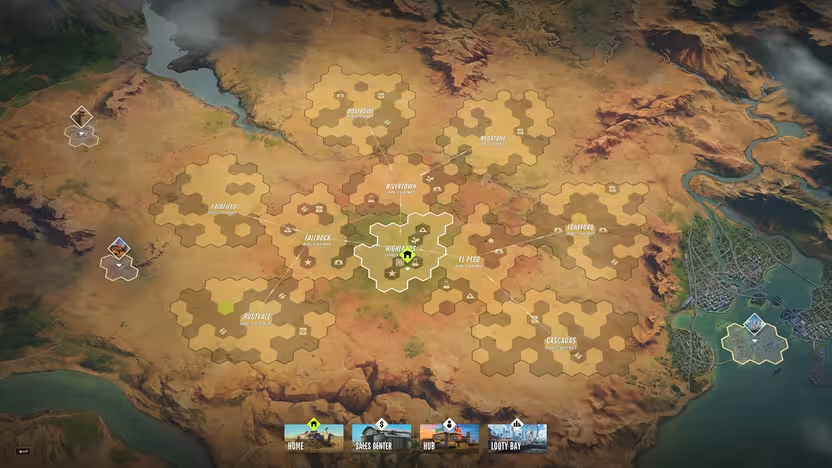
Compare your State IDs before making any changes
Open the Global Map and look in the upper-left corner for your State ID, which includes the region and server number. If you cannot see it, check whether Streamer Mode is enabled, as it can hide the identifier. Share the complete ID with your friend and use it to match the entry in State Selection if you need to change servers. See the server status guide. Steam Community · Finding a State ID · ROB RUN Status · State IDs · Video · Search by server number
The region tells you which group of servers to look in, while the State ID picks out the particular server in that group. Compare the identifier before acting on a region match, because friends can choose the same region and still end up in different states. If you're both just getting started, agree on a state before either of you invests in a base there. If one of you already has a base, agree on who will move only after checking what the game warns that player could lose.
Invite a friend on the same state
In the recorded walkthrough, pressing Tab opens the menu and Party is where the player sends the invitation. Search for your friend using their in-game player ID or select them from the Steam friends list, then have them accept. The clip below points out the Social settings and the player ID, then shows where to look for the Party controls. This is the ID used to find a player, while the State ID identifies the server you want to join.
Watch the friend and party menu walkthrough
The same-server walkthrough at 0:41 also covers the invite and acceptance. If you are already on the same state, start there before considering a server switch. Agree on the exact server number, since two states can be in the same region.
Copy your player UID for the invitation
Kefir documents where to find your own UID if your friend wants to search for you. Press Esc and look on the right beneath your character name, then use Copy UID to put it on the clipboard. Share that value with the person sending the invitation so they can use the player search shown in the tutorial. Keep the server number handy separately for the State Selection screen. Kefir’s UID instructions
Find the player before sending the invite
If your friend does not appear in the menu, compare their in-game player ID with the one you entered or look them up through the Steam friends list shown in the walkthrough. The separate friend tutorial also points to the friend-request setting under Social, which gives you one place to check when requests are unavailable. Once you've selected the right person, have them confirm that they see and accept the request. Keep track of whether the failure happened during the search, the invitation or acceptance so you can describe it accurately. Social and player ID walkthrough
Count party slots separately from clan membership
The three-player limit includes the player sending the invitation, so a party has room for you and up to two friends. If several people want to play together, agree on the party lineup before trying to add everyone to the same group. Kefir describes clans separately and says that a clan currently exists on the server its members have chosen. Use the clan guide if you're looking for a longer-term group rather than a party for this session. Kefir’s clan FAQ
If five of you are playing from the same room, connect each PC to the internet and pick the same official State. Kefir caps a Party at three, including the person sending invites, so use separate Parties if all five want to group up. You can join one clan on that State, but joining the clan does not put both Parties in the same Looty Bay session. See the clan guide. ROB RUN · Steam · Kefir · Looty Bay · Kefir · Steam FAQ · r/robrun
Change servers through the Prison
Kefir’s help page directs you to open the Global Map, select Prison and choose Surrender to Feds. In the Prison, select the server your friend uses. In the recorded walkthrough, the player searches the selector using the agreed state number and confirms the match. After the switch, send a fresh party invitation. Kefir’s cross-server instructions
Watch the State ID search and confirmation
Select the matching state from inside the Prison
Have the friend who is staying on the destination server keep its ID handy. In the recorded tutorial, the moving player enters the agreed number in the search box and confirms the match. If you need to switch regions as well, another video shows the Region option in Settings while the player is inside the Prison. After choosing the destination, check which state you actually joined before sending a new invite. State selection walkthrough · Region setting in the Prison
The official route starts at the Prison on the map. A separate walkthrough uses Settings, opens Other and selects Surrender to Feds from there. The two routes shown lead into the Prison, where the server choice takes place. Read the current screen at each step, particularly if you opened the surrender option from Settings while looking for an ordinary party control. Settings walkthrough
Check the confirmation before surrendering
Before confirming Surrender to Feds, treat your bank balance, vehicles, belongings, property and land in the current State as subject to confiscation. The recorded Court Ruling lists those categories, and the transfer warning covers unclaimed mail rewards. Kefir’s protection for banked money applies to theft by other players, so check the federal warning even if you have already laundered your cash. Shipments and research still need a same-version before-and-after check. See the Federal Raid guide for the scheduled wipe. Tpose Gaming · Court Ruling screenshot · Kefir · Banked money · robrungame.com · Transfer warning
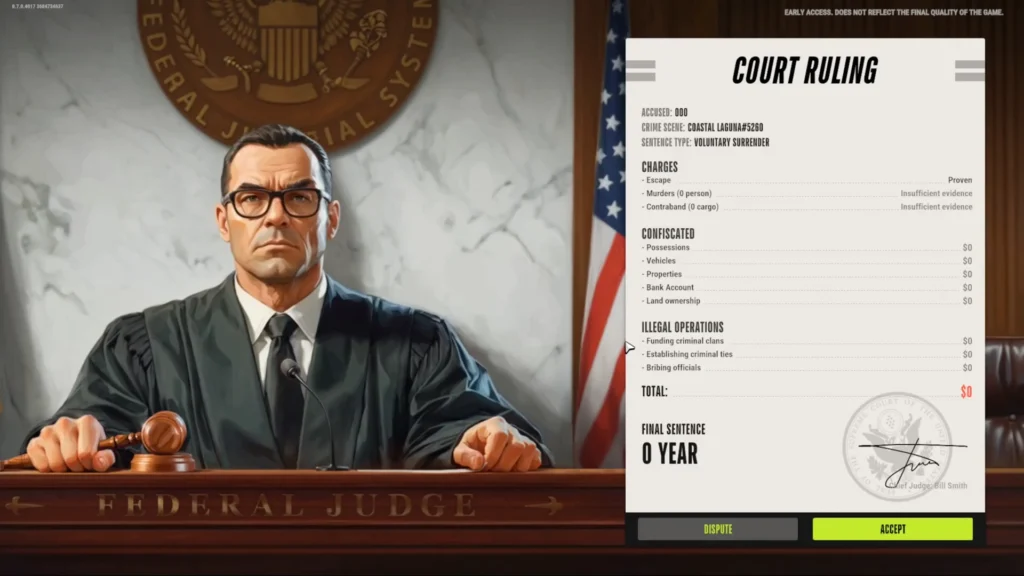
Also check whether your plans depend on your current clan. Kefir says clans belong to the chosen server, so confirm where the group plays before changing states to join it. If your reason for moving is a scheduled reset, check the server's age and the published wipe information separately. This can help you decide whether you actually need to move or just coordinate your next session with the same people. Kefir’s clan FAQ
Press the letter O to open Mail with the default PC controls. Check pending rewards in the State you are leaving before confirming Surrender to Feds. The prison map also marks a Mailbox if you are looking for it in the prison. The transfer warning applies to unclaimed mail, and the confiscation warning still applies to any items you take out of it. See the Federal Raid guide. Raison Detre · PC controls · robrungame.com · Transfer warning · MetaForge · Prison mailbox
Check your season currency before leaving the current Realm. The Pure Chemistry client data says you lose any unspent amount when you leave. Claim any free rewards you want and can afford at Lenny’s or in a settlement before leaving. See the Decoder reward guide. Wikily · Pure Chemistry client data · MetaForge · Season and wipe rules
Enter Looty Bay together after accepting
An accepted invite gets the players into a party, and the recorded session shows a separate check when the party tries to enter Looty Bay. At 5:17 the group reads an on-screen instruction that everyone needs to be on the global map before they can enter the city together. In that session, the players first had to coordinate leaving the area where they were standing. If someone is still at the Motel, have them reach the global map and retry city entry with the group. Recorded city-entry prompt
If you can see each other in Party but can't enter together, record the message that appears when you select the city. The city-entry example applies at the point of travelling together, while the official Prison instructions apply when an invite reports a different server. If your state matches and the issue still recurs, send the prompt and the sequence to the support channel Kefir lists. Include whether the invite was accepted and whether everyone was on the global map. Official support channels
Players have reported meeting people in Looty Bay who they believed were based in a different State. Those accounts do not establish how city sessions are assigned, and Kefir’s published party instructions cover the separate case where an invite says your friend is on another server. For a planned party, compare both State IDs and use the in-game invite message to decide whether a transfer is needed. See the server status guide for connection failures. r/robrun · r/robrun · Kefir
Agree on how you’ll split the loot before entering Looty Bay. Kefir suggests assigning entry, carrying and cover to different players. For the payout, one method players describe is selling the loot, picking up the cash and splitting it manually back at base. The PC controls list hold Alt for Split Items if you need to divide a stack in your inventory. See the guide to selling loot safely. r/robrun · Kefir · Looty Bay · Kefir · Selling loot · Raison Detre · PC controls
A teammate can help while you’re in Knockout. The in-game Codex says the rescue window is limited, and players describe reviving teammates who crawled out of sight during a raid. If you go down, call out your location so your party can find you. When you reach a downed teammate, check the interaction prompt on your screen. See the beginner guide to healing and equipment. Wikily · In-game Codex · r/robrun · Player discussion
If the invite still fails
Compare the state number again and send a fresh invitation from Party. If the problem persists, record the exact prompt and what each player sees, including the server number. Check the server status guide for known disruptions before trying another transfer.
If the error returns after both of you confirm the same state, capture it before changing anything else. A useful report includes the time, region, State ID and whether either player saw the invite arrive. Add the exact sequence you followed, including whether you sent a fresh invite after changing states. Those details help distinguish a server mismatch from a problem that persists after both players are in the same place.
With default PC controls, T is the Voice Chat Key. If friends cannot hear you, check that binding and test the selected microphone under Windows Settings → System → Sound → Input. If the microphone works in Windows, check that desktop apps have microphone access, then try the game again. See the PC settings guide. Raison Detre · PC controls · Microsoft · Microphone test · Microsoft · Microphone access
If general text chat says you need a settlement, check whether you rent a plot there. Kefir’s November 11 update made a plot rental a condition for sending messages in general chat. The announcement describes a posting rule for general text chat. See the plot rental guide. Kefir · November 11 update
If the voice icon keeps spinning and you can neither hear nor speak, record that symptom separately from a microphone that only fails to transmit. After the microphone checks above, take a screenshot or short video if the icon still spins. Kefir asks for the steps leading up to a bug along with an image or video. See the server status guide. Kefir · Troubleshooting and Support
If a teammate disappears after respawning, check whether their name is still in Party and whether their map marker is visible. One player reported losing sight of both the character and the marker while the teammate stayed in the party. Compare your State IDs and current locations, then send Kefir screenshots or clips from both views if the problem persists. Keep your current State progress while you investigate, because confirming Surrender to Feds triggers confiscation. See the guide to what the Feds confiscate. Tpose Gaming · Firsthand player report · Kefir · Bug reports