
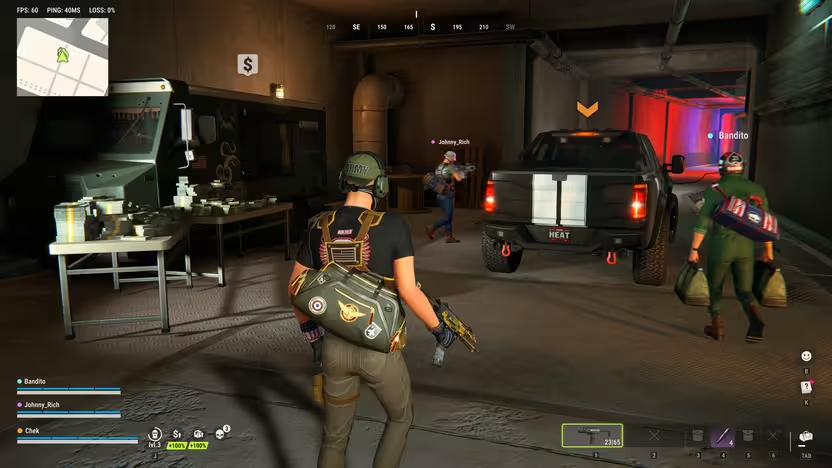
To sell items in ROB RUN, look for the dollar-sign van on the map in Looty Bay or the Sales Center and sell your valuables to the fence there. Pick up the cash from the counter before leaving. If you cannot trade, check your role and the prompt in your version of the game, since a playtest recording shows a Criminal-role requirement.
What should I keep when my bag is full?
Check the item's use before comparing its sale offer per occupied slot. Keep a key or barter component if it opens the route you are working toward; compare ordinary loot using offers from the same buyer and Notoriety level. If an item is bulky, reserve the right cargo space and account for the separate buyer before taking it instead of something you can carry out in your bag. Related guide · Kefir · 13 Nov · Steam Community
Where can I claim a free Lottery Ticket?
Open the free reward track in Season 1 Pure Chemistry and look on page 1 for the Uncommon Lottery Ticket. The client catalog lists it for 150 season currency. Use the basic ticket, check the resulting prize item and read the Fence’s offer before selling it. Related guide · Source 1 · Source 2
Selling Trash and Lottery Tickets
Sell the Trash item at a Fence, the dollar-sign van on the Looty Bay map, and pick up the cash from the counter. The November 12 client catalog lists a starting Fence price of 10 in-game cash per item and a stack limit of 50. If you searched a dumpster, check your inventory first: Trash goes to the Fence, while any cash you found is already yours. Check the buyer’s quote before selling. Client item data · Kefir
The catalog lists both common and legendary Lottery Tickets. A community guide describes choosing Use on the ticket before selling it to a Fence, while the legendary entry separately lists a sale estimate. Check the prompt on the ticket you actually have and the amount offered by the Fence before relying on the estimate. See the safer selling guide. ROB RUN Info · Wikily · ROB RUN Wiki
The November 6 client catalog lists the legendary Lottery Ticket as a one-cell valuable with an estimated sale value of 250,000. A separate Fence price reference gives the same figure at level 1 and higher estimates at higher levels. Check the buyer’s actual offer for the ticket you have before confirming the sale. See the safer selling guide. Wikily · ROB RUN Fan Info
The November 6 client catalog lists an Exotic Lottery Ticket that occupies one bag cell and has an estimated sale value of 1,000,000 in-game currency. The separate Legendary ticket has an estimated value of 250,000 in the same catalog. Check the rarity on the ticket and use the Fence’s actual offer to judge the sale. See the safer selling guide. Exotic Lottery Ticket · Legendary Lottery Ticket
Check the rarity and the action on the item before trying to sell a Lottery Ticket. The client catalog calls the Uncommon ticket a consumable and the Legendary ticket an item for sale, even though both have the same name. If the Fence accepts your ticket, use the displayed offer to check the price and pick up the cash from the counter after the sale. The payout for that sale is collected there before you take it to your base to launder. See the banking and laundering guide. ROB RUN Info · Uncommon Lottery Ticket · ROB RUN Info · Legendary Lottery Ticket · Kefir · Selling loot
The November 12 client catalog lists four possible prize tickets when you scratch a basic Lottery Ticket: Low, Medium, High and Jackpot. The server chooses the outcome, and the catalog does not give the odds. Check the resulting ticket and compare it with the actual Fence quote before selling. If you accept the sale, collect the cash from the counter. See the guide to selling safely. Rob Run Stash · November 12 client catalog · Kefir · Selling loot
Match your loot to the buyer
Take valuables to the Fence and cargo to the Smuggler, also marked as Cargo Exchange on the Looty Bay map. A set packed at the Collection Table becomes cargo. If you rent a plot, check trading access at your own district’s Sales Center and collect your cash when the transaction is complete. Kefir · MetaForge
If you can walk into a Sales Center but the trader won’t buy your loot, check which district your plot is in. Lenny’s in-game dialogue says anyone can enter, but only players who rent a plot in that district can sell there. Without a local plot, take valuables to the city Fence or cargo to the Smuggler, or follow the plot rental guide to get local trading access. Lenny · NPC dialogue
The November 11 ROB RUN Wiki guide marks four Fences and two Smuggler vans in Looty Bay. Those counts apply to the markers in that guide. Use the dollar-sign Fence marker for valuables and the Cargo Exchange filter for cargo, then confirm the buyer in your session. ROB RUN Wiki buyer markers
For bulky freight, the Contraband Cargo guide explains which workbench opens a crate, which repacks contraband and how to check the Smuggler’s offer.
Open the Collection Table at your base and choose the tab for the set you are completing. Add the required items and use the tab to check what is still missing. When the set is complete, select Pack, pick up the Collection Crate from the table and take it to the Smuggler as cargo. See the cargo delivery guide. Client item description · MetaForge · Collection Table · Collection reference
Open the collection’s tab to see the missing items. The inventory marks items needed by your current collections, so check that marker before selling them to the Fence. If you want a different list, use Refresh Collection when the table offers it. Check the new list before setting items aside. See the cargo guide for delivering a finished crate. Client systems reference · MetaForge · Collection Table
Where to find the fence in Looty Bay or the Sales Center
The official selling instructions identify the fence as the buyer for your valuables and direct you to a van with a dollar-sign map marker. They name Looty Bay and the Sales Center as places to look, giving you a destination when your goal is to turn loot into money. Use that marker to identify the selling destination instead of assuming that any nearby merchant handles the same transaction. If you are having trouble getting started, confirm you have found the marked van before troubleshooting the role requirement described in the Playtest.
Check your role before trying to trade
In an introductory Playtest recording, the player explains that selling to the fence requires becoming a criminal. That is a useful troubleshooting clue for the recorded version, while the official FAQ separately explains that the police-versus-criminal role choice happens in Looty Bay. Each time you enter that city, you can choose either role or explore before choosing, so your arrival there does not require an immediate decision.
The same Playtest shows the player holding F to become a criminal after finding the fence. In that sequence, F is used for the role change; it should not be treated as a confirmed shortcut for selling your inventory. Check the interaction prompts in your version when you reach the buyer, keeping the role-selection action separate from whatever trading interaction the game presents.
A beginner guide recorded after launch says its selling route uses the Criminal role. Kefir’s selling guide identifies the Fence and tells you to collect the cash, but it does not list a role requirement. At the van, check the interaction prompt for your character before switching roles.
If you are selling to afford gear, check Black Market access before budgeting for a purchase. (Kefir Help Center · video at 1:25)
Gather valuables without assuming guaranteed loot
The introductory Playtest presents scavenging through trash cans as a way to get starting cash and items, with the player holding E during the search. The footage mentions cash, laptops, and toasters as examples encountered while scavenging, giving beginners an idea of what that particular session produced. These examples describe the recorded Playtest rather than a guaranteed result from every bin, so do not plan a selling trip around receiving a specific item.
A separate Playtest provides an example of alcohol being sold after the players look for a dollar-sign marker. That supports alcohol as a sale item in the shown situation, without establishing that every object you can collect has a buyer. When sorting out what to sell, distinguish between an item appearing during scavenging and an item actually being accepted in a trade; those are different observations.
Check for payment, then plan your return
After the sale in the second Playtest, the players point out a cash pile with a take prompt and discuss taking the money. Make checking the transaction area part of your selling routine, because this example shows payment that the players still need to collect. Follow the prompt shown in your game for that step; the recorded exchange does not establish a particular keyboard button for picking up the proceeds.
The introductory Playtest then describes returning to the base or hotel through one of the road exits after selling. Treat that as the return approach described in that session, rather than a fixed route that every player must follow from every selling location. Once you have collected your payment, consider your return alongside your next purchase, especially if you still have unsold belongings in your bag or vehicle.
With the trade inventory open, hold G and move the pointer over the items you want to transfer. The PC controls list this as Quick Hover-Transfer Items, and players report using it at a Fence. Check your binding if you’ve changed the controls, and move the pointer only over what you intend to sell. Finish the sale and collect your cash from the counter. See the guide to selling loot safely. Raison Detre · PC controls · r/robrun · Kefir Help Center
Weigh better fence deals against the loot you carry
Official information says a heist streak during a single city visit raises your Notoriety, and higher Notoriety brings better deals from the fence. This connects the terms of a sale to your activity during that visit, rather than making every fence trade equivalent. It gives you a reason to consider when to sell, but it does not establish an exact payout multiplier or a universally best point to cash out.
Keeping valuables in a vehicle while you continue your visit carries a separate risk: the official FAQ says any player can lockpick and raid your trunk anywhere in the city. Moving loot from your bag into the trunk therefore should not be treated as making it inaccessible to other players. When weighing another heist against a trip to the fence, include those stored valuables in your decision, alongside the prospect of better trading terms.
The introductory Playtest also reports that arrest costs you the contents of your bag and vehicle trunk while leaving your gear intact. That account concerns arrest in the recorded Playtest, so keep its scope separate from assumptions about what happens on death. For a selling trip, its practical relevance is the unsold cargo: keeping items for a later transaction can leave those belongings exposed to the reported arrest loss.
Separate cash storage from laundering
Back at the motel in the introductory Playtest, the player demonstrates a cash stash that accepts money but refuses another item they try to deposit. Use that example to distinguish cash storage from general inventory storage, rather than expecting the same stash to hold all your unsold valuables. It fits the cash-management part of the selling loop: the demonstration concerns storing money after returning, not a universal storage solution for everything you collected.
Laundered cash has a specific protection in the official FAQ: thieves cannot steal it. That statement concerns money that has been laundered, while the motel example concerns a place to store cash, so the two should not be treated as interchangeable. Do not assume that depositing sale proceeds into a stash automatically launders them; distinguish where your money is stored from whether it has that protection.
Use sale proceeds with unlock requirements in mind
The official FAQ says earned money supports progression and opens up more gameplay, making selling part of your wider development. For purchases, official help directs you to Shipments through H or the side menu in the desert, Lenny's Motel, or Looty Bay. Some specific items have unlock requirements involving your base's settlement level or accumulated jail time, so having sale proceeds does not by itself resolve every purchase requirement.
The introductory Playtest illustrates another distinction at the black market, where the player unlocks a backpack and then buys it. For that example, unlocking and purchasing are separate steps, so check which step you are completing when you put your earnings toward equipment. Before spending the proceeds of a fence sale, look at the relevant item's requirements and purchase options rather than assuming one payment both unlocks it and puts it in your inventory.