
To get a house in ROB RUN, rent an empty plot in a settlement with an owner and place a house from your inventory. Pay the rent at the sign next to the plot. For plots in level 2 or level 3 districts, Kefir also lists special Black Market documents as a requirement.
How do I find and grow a bush in ROB RUN?
Look for a Growing Bush as cargo in Looty Bay. Players reported finding one in a gas station back room, so treat it as a place to check rather than a guaranteed spawn. Research the Grow Room and then the Grow Table, carry the bush back and place it on the table. Harvest when the check mark appears, sell the Harvest Bags to a Fence and leave the bush on the table for the next cycle. Related guide · Source 1 · Source 2
Which car to get and where to fit upgrades
Start with a parking-terminal rental for transport if you don't have an active vehicle. For a personal car, get a plot with a house and garage, then use the key locker and check which modules the model accepts under the hood, in the trunk or on the underside. The Buletti Soltempra, often called the Lambo, is a car to look up in the Trade Laptop. Kefir's launch notes say the Buletti cannot carry Shipments, so choose a cargo-capable vehicle for that job. Kefir Help Center · Kefir Help Center · Kefir · Steam · ROB RUN Info
For a vehicle, compare cargo slots separately from trunk cells. In the vehicle catalog, the Spark has 1 cargo slot and 12 trunk cells, the Longhorn Van has 6 and 48, and the Buletti has 0 and 12. Wikily · Kefir
In the vehicle catalog, the Longhorn Van goes from 6 cargo slots and 48 trunk cells to 12 and 84 with upgrades. The Buletti goes from 12 to 30 trunk cells and has zero cargo slots in either configuration. Use cargo slots to plan trips for shipments and trunk cells to plan space for ordinary items. See the guide to choosing loot. Wikily · Kefir · Steam
For the Buletti Soltempra, Wikily’s November 6 catalog gives a top speed of 115 km/h. HypeGeiger lists a Top Speed field of 90 without showing a unit on its comparison page. Compare speeds from one source that states the unit, and use the cargo and trunk figures above to judge what each car can carry. See the guide to choosing loot. HypeGeiger · Wikily
Once your garage is ready, see the car upgrades guide for key storage and compatible cargo racks, trunk bags and performance modules.
Choose base upgrades by the job they do
After placing a building on your plot, pick facilities for the activity you plan to do there. A Laundering Desk processes cash, a Grow Room supports production, and a Security System takes defensive fuses. Check the slots of the building you plan to use before buying anything, then follow the raid and defense guide for how security affects an attack. Kefir · Steam · EveryGameStat · Kefir Help Center
For security, the client snapshot lists 9 Fuse slots for the Trailer, 27 for the Small House and 42 for the Mansion, with 3 Alarm slots in each. The Trailer and Small House list 1 and 3 laundering speedup slots respectively. See the base defense guide. Wikily · Trailer · Small House
In the November 6 client catalog, the Trailer has 1 cargo workbench slot, 2 storage slots and 1 shelving slot. The Small House has 2 workbench, 7 storage and 2 shelving slots. The Mansion has 3 workbench, 7 storage and 5 shelving slots, with 6 laundering speed-up slots. See the base defense guide. Trailer · Small House · Mansion
At the Cargo Opening Workbench, fit Locksmith Tools in the Tools slot to speed up opening or a Bench Vise in Extra Slots for more cargo space. The Contraband Workbench takes a Label Printer in Speedup and a Tool Box in Extra Slots. Check the name of the module and the workbench before buying either one. See the Black Market guide. ROB RUN Wiki · Kefir · Steam
Unlock and buy the plot title before you travel
At Lenny’s Black Market, open Construction and find the Land Plot Title for your district. Unlock the document in Shipments, then return to the listing and buy it. In the November 6 client data the level-one title lists $50,000 to unlock and $100,000 to buy, before any rent or local price differences. Check that the title is in your inventory before following the plot rental steps. Kefir / Steam · 43:26 · Wikily
If a Land Plot Title is missing after you paid, check whether the transaction was a Shipments unlock or a purchase from the Black Market. An unlock makes the document available to buy. Return to the listing to check its status and look for the title in your inventory after buying it. See the Black Market guide. r/robrun · Kefir · Recorded title purchase
Start with a vacant plot in an owned settlement
Your first step is choosing a settlement that already has an owner, because that is a requirement for establishing a base. Within that settlement, look for a vacant plot and use the sign immediately beside it to pay rent. This is the documented route for renting your own base space, so the plot sign is the place to begin when you want somewhere to build.
Check the district level as you choose your plot, since the housing requirements change for level 2 and level 3 districts. Those plots require special documents obtained from the Black Market in addition to the rental step. The vehicle guidance separately tells you to buy a plot containing a house or garage before purchasing your own vehicle and keeping its key in your key locker. That vehicle requirement should not be treated as a complete set of instructions for purchasing a standalone house.
In a recorded first-home run, the player gets a Land Plot Title, finds an empty plot and chooses Rent at the site. Kefir’s plot guide confirms that rent is paid at the sign next to an empty plot in a settlement with an owner. For a plot in a level 2 or 3 district, check the additional Black Market document requirement.
If you need to raise funds first, compare the documented ways to earn money in ROB RUN. (Kefir Help Center · video at 27:23)
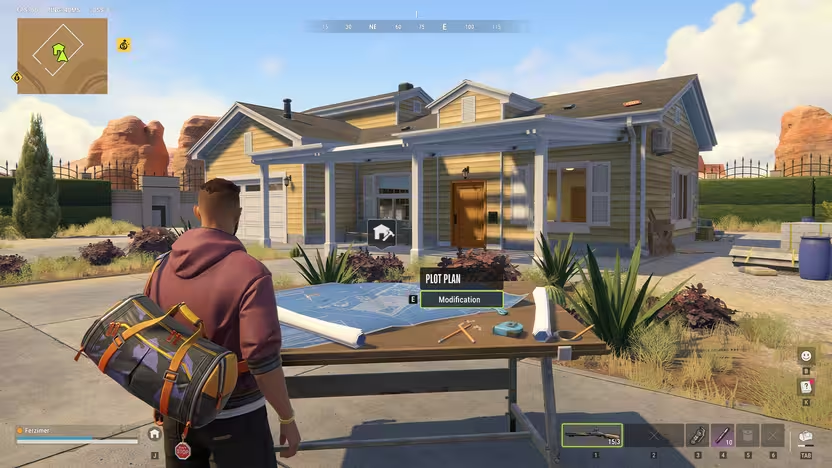
Before buying your first Land Plot Title, clear a single 2 × 2 space in your bag. After research, buy the title from the Trade Laptop and check the bag before travelling. Once the rental sign confirms the lease, use the Plot Plan on your land to place a building from your inventory. The plot rental guide shows how to find a vacant plot at the right district level. Land Plot Title · Plot Plan
For your own base, rent the plot first and then place the house. See buying land vs buying a house for the difference between a plot rental, a building and ownership of an entire settlement.
How to place a house from your inventory
Construction in ROB RUN uses items placed directly from your inventory, including houses, fences, farms, and garages. The same system covers functional objects such as safes, shelves, workbenches, vises, garden beds, and cooking pots. You can acquire construction items by purchasing them, finding them as loot, or taking them from another player's bag. Obtaining the building item and placing it are therefore part of the construction system, while renting the land is a separate step.
The main building starts with a laptop, a first-aid kit, and a few cabinets, giving you a small set of essentials. Additional furniture and workbenches are yours to set up, so the initial building is only the beginning of furnishing a base. Use the inventory placement system for the relevant objects as you put together the facilities you want. The base also serves as an additional respawn point after death, giving it a purpose beyond holding your belongings.
Upgrade facilities around the activities you use
Your hideout supports building and upgrades, storage for loot and vehicles, and the placement of workbenches and safes. Workbenches can receive modules that unlock additional functionality, so upgrading a workshop includes improving the benches themselves. Farms, warehouses, and laboratories are also among the structures you can construct at your base. These options let you develop the property through individual buildings and functional items rather than treating the house as the whole base.
Several facilities have specific uses described in the base guidance: a farm can grow bushes, and a laboratory can use chemical reagents. Cargo found around the map can be brought back, placed at your base, and opened there. Storage gives you somewhere to keep items you do not yet have a use for. Choose which of these facilities to add according to the activities and materials you want to bring into your base.
Open the building plan to place the First Aid Cabinet on a wall at your base. The client describes it as a place to heal and says it lets you respawn next to the cabinet. Check your building plan for a placement before buying it. See the beginner guide for healing on a run. Wikily · First Aid Cabinet · Building plan reference · Kefir · Base Management
Add vehicle space and workshop equipment
A garage is an option when you need more room for another car, while a helipad accommodates a helicopter found while looting. You can also install a lift at your base to change vehicle modules yourself. That provides a base facility for work that would otherwise involve visiting the city auto repair shop. These vehicle structures extend what your property can do alongside its housing, storage, and crafting facilities.
For purchasing your own vehicle, the official vehicle help specifically calls for a plot with a house or garage. It also tells you to store the vehicle's key in your key locker. Keep that purchase requirement in mind when choosing property for vehicle ownership, alongside the separate options for adding a garage, helipad, or lift. The housing and vehicle instructions describe connected uses for your base, but they do not supply a separate house-buying sequence.
Consider territory level, shipments, and relocation
Your home territory's level affects which criminal contacts you can access and, through those contacts, which goods are available to purchase. Higher territory levels open more opportunities, making location relevant to the facilities and supplies you can pursue. The Shipments tab also includes items whose unlock conditions require a base in a settlement of a specified level. Other shipment items require accumulated jail time, so a higher-level home is not the only unlock condition to consider.
Open Shipments by pressing H or using the side menu while in the desert, Lenny's Motel, or Looty Bay. Check the relevant item's unlock condition when deciding whether a different settlement level would help you. If you want to move, the base system allows you to relocate the entire base together with everything inside it. You do not have to rebuild the property from scratch whenever you change locations.
Protect stored goods against other players
You can store stolen goods at your base, but other players can raid it, so storage does not make those goods untouchable. Installing fuses in the Security System makes attackers spend more time and resources hacking it. Defense modules can alert your allies when an attack is underway. Those are specific defensive functions to consider as you add storage and other facilities to the property.
No base is completely safe, even after you add defensive equipment. The game's description also warns that a more lavish hideout attracts more intruders. Treat defenses as ways to complicate an attack and notify allies, rather than a promise that your belongings cannot be raided. That distinction matters when your house also holds stolen goods and the facilities you have collected.
If your character is trapped in the world and reconnecting puts you back in the same spot, look under Settings → Other for the option to respawn at home. A Steam player confirmed this worked after getting stuck inside a building. Read the in-game warning before confirming, since players report a risk of losing carried gear. Kefir’s ordinary death rules vary with your role and location. See the roles and equipment loss guide. Steam Community · Stuck player report · Kefir · Death and equipment loss
Understand settlement ownership and the weekly reset
Buying an entire settlement with rentable plots is another property mechanic, separate from renting a plot for your personal base. As the settlement owner, you receive a share of the money tenants spend and launder. You must collect that share in person. This is the ownership option associated with tenant income; the personal base instructions instead direct you to pay rent at a vacant plot's sign.
Property also falls under the Federal Raid cycle: every seven days, plots, bases, weapons, and cash are wiped and converted into jail time and authority. Your house and base should therefore be understood as property within that cycle, rather than permanent holdings. Cosmetics, your player name, tutorial progress, settings, and accumulated jail time carry over. The reset removes the listed property and resources while preserving those specified parts of your progress.